I'd like the team's feedback on a design for real multi-monitor support in RenkuOS: independent displays that each have their own resolution, refresh rate, and color depth, all part of one desktop. This is not the old BeOS-style "one wide screen split across two monitors".
The full design document is on GitHub, with every claim tied to a file and line in our tree:
Multi-monitor support: design proposal
Below is the short version.
What users get
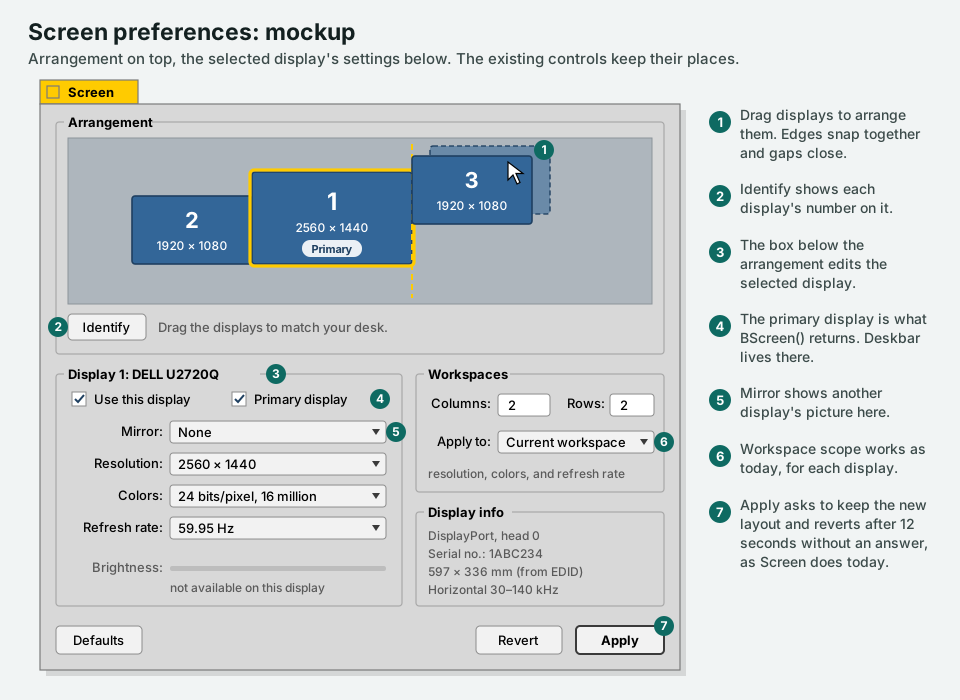
- Every connected display is part of one desktop, arranged by dragging them in Screen preferences.
- Each display has its own resolution, refresh rate, color depth, and brightness.
- Windows move freely between displays and can straddle two.
- Mirroring, for presentations.
- Plug a display in or out without restarting anything, and a known set of monitors gets its old layout back.
- Existing Haiku applications keep working without a rebuild, including gcc2 binaries.
Decisions I've made (push back if you disagree)
- Haiku application compatibility does not break. Drivers may change.
- No upstreaming. We are not following upstream's 2018 proposal (Gerrit 329), and we don't plan to send this upstream.
- Windows can straddle displays. The display that shows most of a window owns it.
- A workspace spans every display. Switching workspaces switches all of them.
- No per-display scaling (HiDPI) yet, but the design leaves room for it.
BScreen() means the primary display, so old apps put dialogs and full-screen windows on one monitor instead of across the bezel.- First drivers: virtio-gpu (QEMU), radeon_hd, and intel_extreme.
How it works
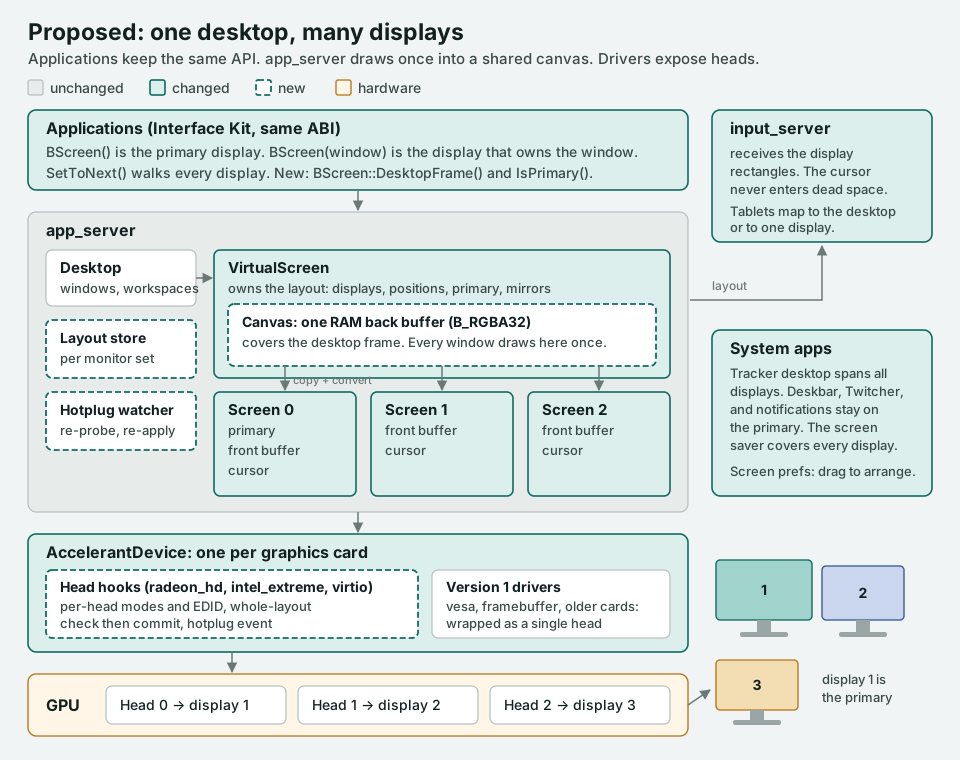
- Drivers expose heads. New, optional accelerant hooks let a driver list its outputs and check a whole layout before anything changes, then apply it in one step. Heads share clocks and memory bandwidth, so a driver has to see the whole picture. Our RadeonHD experiments in July showed exactly that. Old drivers keep working as a single display.
- app_server draws once. It already draws every window into a buffer in RAM and copies the changes to the screen. That buffer grows to cover the whole desktop, and each display copies its own part. A window across two displays costs nothing extra.
- The cursor never gets lost. It crosses only where displays touch, and never into the gaps between them.
- libbe gets fixed, so old apps work. Menus and tooltips open on the display you clicked on, because the fix lives in the shared library.
Coordinates and which display owns a window
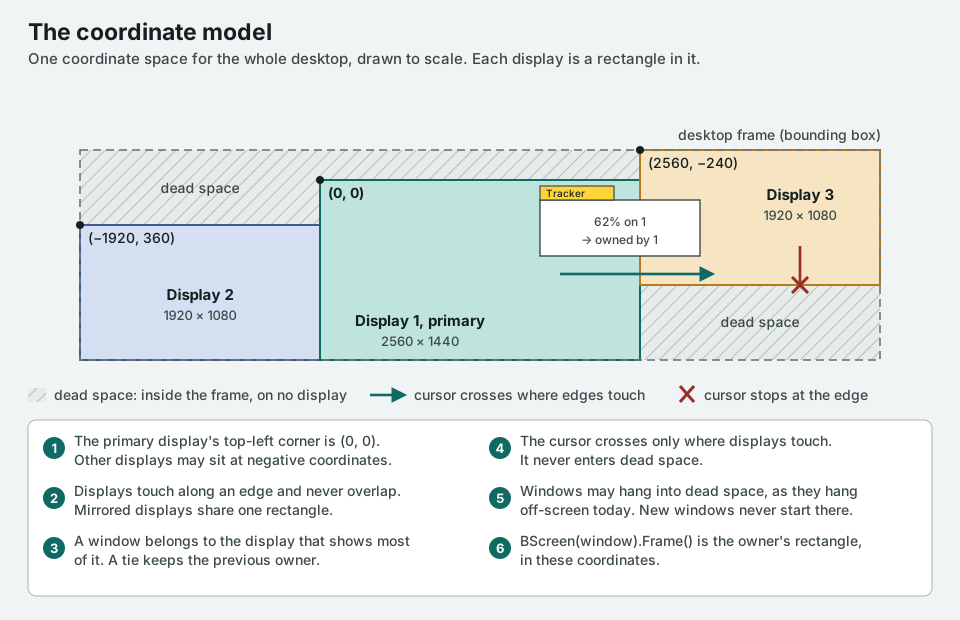
The primary display's top-left corner stays at (0, 0), so anything that assumes the screen starts there lands on the primary. Displays to the left or above get negative coordinates, as on Windows.
Screen preferences
Plan
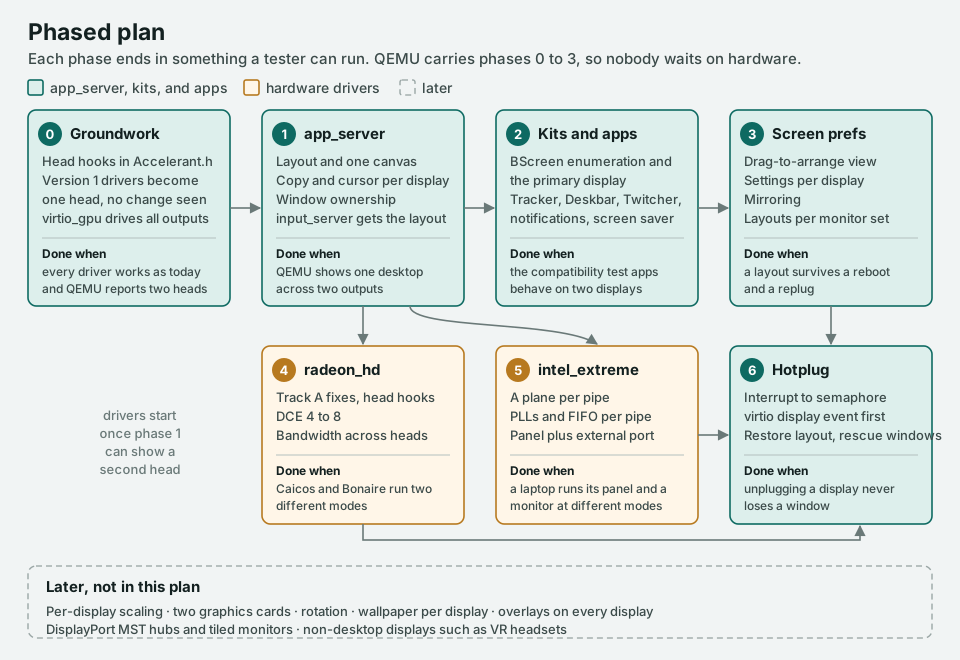
QEMU can show several monitors through virtio-gpu, so the first four phases need no special hardware. Anyone on the team can build and test them.
Where I'd most like input
- Should a new window open on the primary display (my proposal), the display with the cursor, or the display with the active window?
- Haiku lets each workspace have its own resolution. Keep that per display, or drop it once there's more than one display?
- Should Deskbar, the Twitcher, or notifications ever follow the display with the cursor?
- When a full-screen game takes over one display, should the others keep showing the desktop or go black?
- Which Intel laptops and generations should the intel_extreme work target first?
- Is anyone interested in owning a phase? Phase 2 (Interface Kit and system apps) and phase 3 (Screen preferences) don't need driver experience.
The document's last section has twelve open questions in total. Comments on any part are welcome here or on GitHub.