Hokku OS is a CachyOS respin whose desktop is Hokku, my Cosmoe fork (the Haiku API on Linux). Haiku's Tracker and Deskbar run as Wayland clients of labwc. The first release, 1.0 Icefell, is out as a live and install ISO.
What's in it
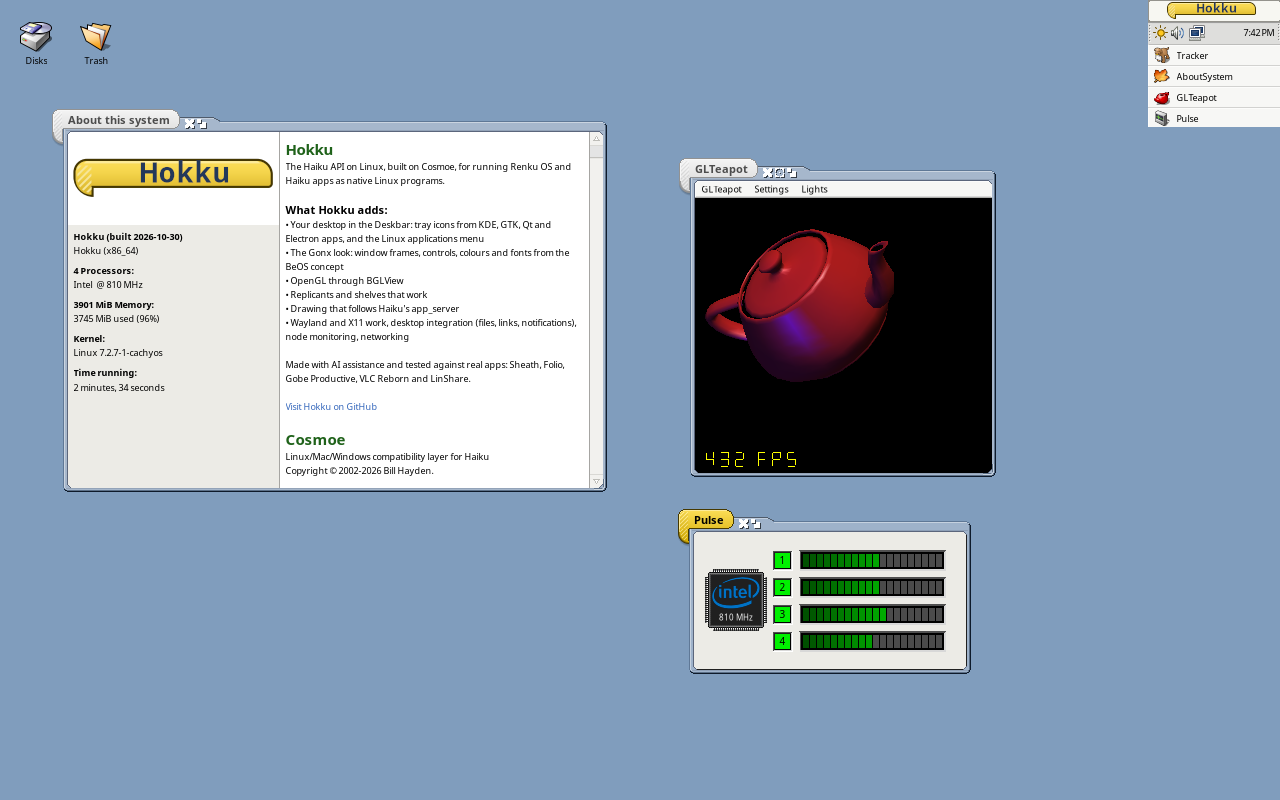
- Desktop: Hokku r63, which is labwc + Tracker + Deskbar + Terminal, with Xwayland for X11 apps. The Deskbar has a tray for other desktops' applets (network, volume, Bluetooth) through TrayBridge, a brightness slider on laptops, Hokku's notifications, and a menu that lists every app, Hokku and Linux alike.
- Apps: Hokku's own (Terminal, StyledEdit, ShowImage, Icon-O-Matic, DeskCalc, CharacterMap, GLTeapot and the other demos), plus Folio, Sheath and Ringbinder, built against the system Hokku.
- Look: Gonx throughout (
gonx-theme revert goes back to Hokku's own look).
- Displays: wdisplays and kanshi (resolution, scale, arrangement, rotation).
- Login and install: greetd + tuigreet. Calamares installs offline.
- Base: CachyOS's kernels, repositories and hardware detection, built for generic x86-64, so it runs on CPUs without AVX.
How it differs from Vitruvian OS and upstream Cosmoe
Vitruvian OS also brings Haiku to Linux, but as a new system around it: a Debian-based image with its own display server (derived from Haiku's app_server, not X11 or Wayland) and the Nexus kernel modules for ports, semaphores and node monitoring. It's in alpha, and GTK and Qt apps aren't integrated yet. Hokku OS takes the other route:
- No custom kernel modules and no replacement display server. Hokku apps are ordinary Wayland (or X11) clients, so CachyOS's stock kernels, drivers and updates work as they are.
- Linux apps are first-class: GTK, Qt and Electron apps run beside Haiku apps, appear in the Deskbar menu, put their tray icons in the Deskbar and their notifications in Haiku's notification window.
- The whole Arch and CachyOS package world is a pacman (or AUR) install away.
- Hokku apps aren't tied to Hokku OS: they run on any Linux desktop, even as AppImages.
Upstream Cosmoe is the library Hokku is forked from. Hokku still merges it, and anything that builds against Cosmoe builds against Hokku, but Hokku builds a full desktop on top of it, with the features below, and brings the kits much closer to Haiku.
New in Hokku, built for this release
None of these exist in upstream Cosmoe:
- Deskbar tray (TrayBridge): tray icons of KDE, GTK, Electron and VPN apps as Deskbar replicants, with their menus, tooltips and live updates.
- Notifications: Haiku's notification_server and preferences (Cosmoe had none), serving Hokku and Linux apps alike, with action buttons (
BNotification::AddAction(), since merged into Renku OS).
- Linux applications menu in the Deskbar, by category, with icons.
- Brightness slider in the Deskbar, through logind, no root needed.
- Our own window frame, drawn in Cairo: the Gonx tab, flap and rounded corners as client-side frames on Wayland, so windows look like Haiku's under any compositor. Upstream Cosmoe just uses whatever window manager is installed.
- The Gonx look: Gonx controls, colours and fonts, switched on and off with
gonx-theme.
- Touch screens: tap to click, long press for right click, taps open submenus.
- OpenGL with
BGLView over EGL, shown off by GLTeapot.
- Kits closer to Haiku: working
BShelf and replicants, node monitoring, fair semaphores, BRoster seeing apps without windows, shared recent documents and apps, apps typed correctly on ext4.
- Wayland robustness: menus and panels placed properly, and the desktop and Deskbar come back after switching to a text console.
The full list is in the Hokku README.
Hokku OS and Renku OS
Both run the same API, so work done for one tends to land on the other. Hokku OS needed buttons on notifications (Reply, Mark read, Snooze), so they were built in Hokku as BNotification::AddAction(), then proposed to Renku OS (RenkuOS/Source#233), which merged them the same day. It works the other way too: Gonx was made for Renku OS, and Folio, Sheath and Ringbinder are Renku OS apps that Hokku OS builds from the same source.
Download
The ISO is 2.7 GiB, so it comes in two parts on the release page. Join the parts and check them:
cat hokku-os-1.0-icefell-x86_64.iso.part1 hokku-os-1.0-icefell-x86_64.iso.part2 > hokku-os-1.0-icefell-x86_64.iso
sha256sum -c SHA256SUMS
Write it to a USB stick and boot. The live session logs in as liveuser, and "Install Hokku OS" is in the Deskbar menu.
Testing and known gaps
Between 27 and 30 October, about 14 ISOs were booted in QEMU and about 35 bugs were fixed, most of them in Hokku itself. Real hardware has had much less testing, so reports are very welcome.
- There's no hosted [hokku] pacman repo yet, so installed systems don't get Hokku updates
- Calamares and the boot splash still show CachyOS branding
- The installer's auto-login option is ignored
- x86_64 only
Not affiliated with or endorsed by CachyOS.
Release: https://github.com/idumych/hokku-os/releases/tag/v1.0
Repo: https://github.com/idumych/hokku-os
The Hokku library thread: https://forum.desktoponfire.com/d/116-hokku-the-haiku-api-on-linux-for-freestanding-app-ports-a-cosmoe-fork