Gonx was a BeOS concept from around 2001 by Cotito. It was only ever artwork. This project brings its look to Renku OS and Haiku: a window decorator, a control look, desktop and system colours, and fonts. It's a new implementation drawn to match the mockups, with no code from BeOS, Dano or Zeta.
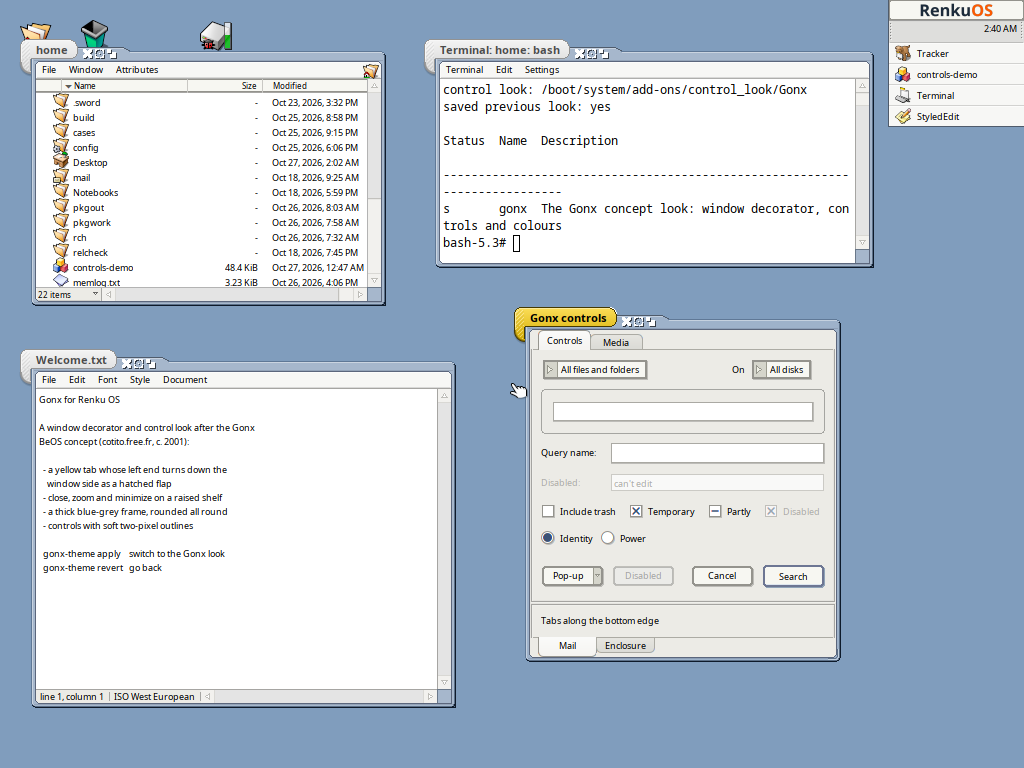
What's in it
- Window decorator: a yellow tab (light grey when inactive) whose left end turns down the window's side as a hatched flap. Close, zoom and minimize sit together on a raised shelf to the right of the tab, which slopes down into a thick blue-grey top band. The frame is rounded at every corner, and a two-tone bracket marks the resize corner.
- Control look: flat off-white buttons with a thick outline and a soft shadow, square menu fields with the arrow on the left, blue check marks, rounded tabs and group boxes, and pill-shaped scroll thumbs and slider knobs.
- gonx-theme:
gonx-theme apply switches on the decorator and control look and sets the blue-grey desktop, matching system colours and fonts. gonx-theme revert puts back what you had before, and gonx-theme status shows what's active.
You can also pick either part on its own in Appearance → Look and feel, or set the decorator with setdecor Gonx.
Install
Download gonx-0.1.zip from the releases, unpack it, open Terminal in the folder and run sh install.sh. If a compiler is installed, it builds Gonx against your own system first, which is the safest way since the decorator runs inside app_server. Otherwise it uses the prebuilt files. Everything goes into ~/config/non-packaged, and sh uninstall.sh removes it.
If the desktop ever fails to start, for example after a system update, hold Space while booting and choose Disable user add-ons. Then run sh uninstall.sh, or sh install.sh --build to rebuild for the new system.
Tested
- Renku x86_64 (hrev60072): prebuilt, built on the system, and as an .hpkg, including rebooting with Gonx active
- Haiku R1/beta6 x86_64: installed both built on the system and prebuilt, and uninstalled cleanly
- Not tested yet: Stack & Tile, fonts above 12 pt, dark colour schemes. arm64 isn't built yet.
Known rough edges: windows that are already open keep square inner corners after a decorator switch until they're resized, reopened or you reboot. The flap's shadow is painted over the desktop colour, so over another window it shows as a thin dark edge. Pop-up buttons keep their arrow on the right.
Still to come: the desktop shell from the same mockups. That's the left panel, the right sidebar, the tray and clock, a dock of running apps, and the radial "Perso" folder menu.
Get it: https://github.com/idumych/gonx (MIT)
Credits go to Cotito for the concept and colours. The tab and control shapes follow screenshots of Dano's Origin decorator, and the button glyphs come from Momo's 2004 IceWM Gonx theme. Feedback and screenshots very welcome!